
Proxmox Virtual Environment — Enterprise-Grade Open Source Virtualization
Proxmox Virtual Environment (Proxmox VE) is a powerful open-source server virtualization platform that combines KVM-based virtual machines and LXC containers in a single, unified management interface. As a certified Proxmox Partner, Wekos deploys, manages, and migrates Proxmox VE environments for clients across every industry — from SMB single-node setups to enterprise multi-cluster deployments with Ceph distributed storage.
Proxmox Partner solution delivered by Wekos
Wekos presents this resource guide to Proxmox Virtual Environment — the platform we recommend, deploy, and manage for clients who need enterprise-grade virtualization without enterprise-level licensing costs. We have provided a summary of the platform’s core capabilities and subscription options below to help you understand what Proxmox VE offers and what a subscription includes. For full technical documentation, visit proxmox.com directly. If you want to discuss whether Proxmox VE is the right fit for your environment — or want a quote for deployment or migration — contact the Wekos team.
- Proxmox solutions partner
- VMware to Proxmox migration expertise
- Proxmox + Ceph cluster design and deployment
- Ongoing managed services for Proxmox environments
- Proxmox subscription procurement through Wekos

What Is Proxmox Virtual Environment?
Proxmox VE is an open-source server virtualization platform built on Debian GNU/Linux using a custom Linux kernel. It manages two virtualization technologies from a single interface: KVM (Kernel-based Virtual Machine) for full virtual machines, and LXC for lightweight Linux containers. The platform is released under the GNU AGPLv3 license, meaning the source code is freely available, inspectable, and open for contributions. Proxmox, the company behind the platform, maintains consistent enterprise-class quality standards across all releases.
- Built on Debian GNU/Linux with custom kernel
- KVM full virtualization for Windows and Linux VMs
- LXC lightweight containers for Linux workloads
- Single web-based interface manages both
- Open source — GNU AGPLv3 license
- Actively developed since 2008
- Source code publicly available at git.proxmox.com
Proxmox VE Core Features & Capabilities
Proxmox VE includes a comprehensive set of enterprise virtualization features built into the base platform — no additional licensing required for HA, live migration, clustering, or Ceph storage.
KVM Virtual Machines
- Industry-leading Linux full virtualization
- Near-native performance on all x86 hardware
- Supports Intel VT-x and AMD-V
- Run Windows and Linux VMs side by side
- Private virtualized hardware per VM — NIC, disk, GPU adapter
LXC Containers
- Lightweight OS-level virtualization
- Shares the host kernel — minimal overhead
- Run multiple isolated Linux systems on a single host
- Managed via the same Proxmox VE interface
- Powerful API and simple tooling
Web-Based Management
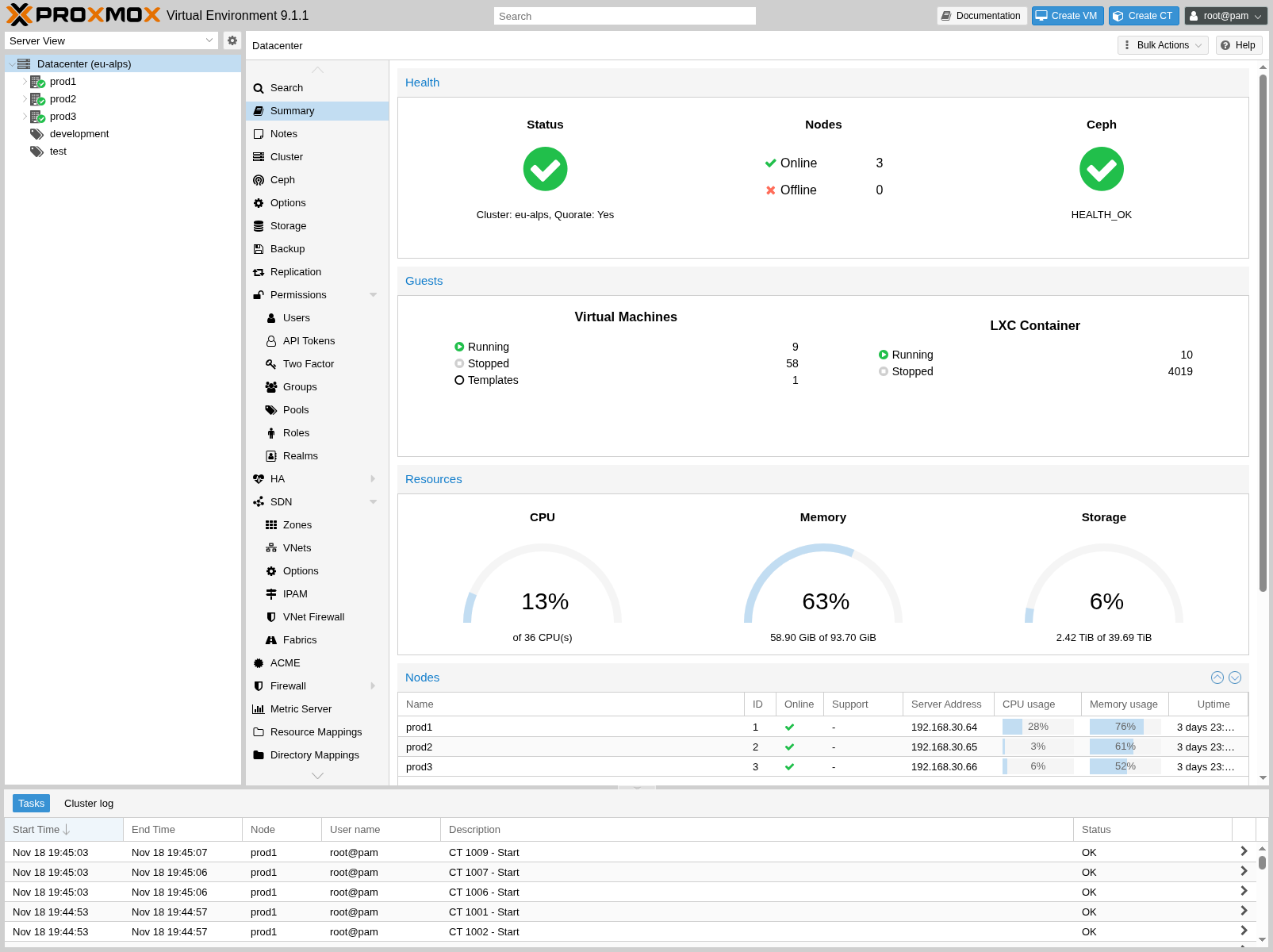
- Full-featured GUI accessible from any browser
- No separate management tool required
- ExtJS-based interface — clean and responsive
- Multi-master design — manage cluster from any node
- Task history and system logs per node
High Availability (HA)
- Multi-node HA cluster built on proven Linux HA technologies
- HA Manager monitors VMs and containers automatically
- Zero-configuration out of the box
- Watchdog-based fencing simplifies deployment
- HA Simulator for testing cluster behavior
Live Migration
- Move running VMs between cluster nodes with no downtime
- Transparent to end users throughout
- Initiate from GUI or command line
- Enables maintenance without service impact
- Works across shared and local storage
Clustering
- Scale from single node to large clusters
- Proxmox Cluster File System (pmxcfs) — database-driven cluster file system
- Real-time configuration sync via Corosync
- Multi-master — no dedicated manager node
- Stores configuration for thousands of VMs
Software-Defined Storage (Ceph)
- Fully integrated Ceph management in GUI
- RADOS Block Device (RBD) for VM disk images
- CephFS for POSIX-compliant shared filesystem
- Self-healing distributed storage
- Scales to exabyte level on commodity hardware
Flexible Storage Options
- Local: LVM, ZFS, directory-based storage
- Network: NFS, SMB/CIFS, iSCSI, GlusterFS
- Ceph RBD and CephFS natively integrated
- No storage limits — add as many as needed
- Live migration enabled with shared storage
Software-Defined Networking
- SDN feature for advanced multi-tenant setups
- VLAN, QinQ, VXLAN tunneling support
- BGP-based EVPN infrastructure capable
- Linux bridge and Open vSwitch support
- Scales from simple NAT to complex overlays
Built-In Firewall
- Cluster-wide or per-VM/container rules
- iptables-based distributed firewall
- Full IPv4 and IPv6 support
- Firewall macros, security groups, IP sets
- Configured from GUI or CLI
Backup & Restore
- Integrated backup with vzdump tool
- Scheduled backup jobs by node and VM
- Full backups including VM config and data
- Proxmox Backup Server integration — incremental, encrypted, live-restore capable
- Single-file restore from VM backups
Management Interfaces — GUI, CLI & REST API
Every management function in Proxmox VE is accessible through three interfaces — whichever best fits your workflow. The web GUI provides a complete management experience without requiring any additional tools. The CLI provides full control via SSH with intelligent tab completion and comprehensive man pages. The RESTful API uses JSON Schema and enables integration with third-party management tools, automation platforms, and custom hosting environments. A mobile app for Android and an HTML5 mobile web interface round out the access options.
- Web GUI — full management from any modern browser
- CLI — intelligent tab completion, full man pages
- REST API — JSON Schema, easy third-party integration
- Android app via Flutter framework
- HTML5 mobile interface for on-the-go management
- All interfaces access the same full feature set
Proxmox VE Subscriptions — Enterprise Repository & Support
Proxmox VE is free and open source — the platform itself has no per-VM, per-CPU, or per-host licensing cost. Proxmox offers an optional annual subscription program that provides access to the Proxmox Enterprise Repository (the most stable and tested package channel), plus enterprise-grade technical support. Subscriptions are priced per physical CPU socket per server, for a one-year term. Wekos can procure Proxmox subscriptions on your behalf as part of your managed services engagement.
Community
$140 / year per CPU socket
- Stable and secure updates
- All platform features included
- Community forum support
- Suitable for: learning and testing
Basic
$430 / year per CPU socket
- Stable and secure updates
- All platform features included
- 3 support tickets per year
- Response time: 1 business day
- Datacenter Manager Enterprise Repository
- Suitable for: growing businesses
Standard
$640 / year per CPU socket
Most Popular
- Stable and secure updates
- All platform features included
- 10 support tickets per year
- Response time: 4 hours within business day
- Remote support via SSH
- Offline subscription key activation
- Datacenter Manager Enterprise Repository
- Suitable for: most production environments
Premium
$1,280 / year per CPU socket
- Stable and secure updates
- All platform features included
- Unlimited support tickets
- Response time: 2 hours within business day
- Remote support via SSH
- Offline subscription key activation
- Datacenter Manager Enterprise Repository
- Suitable for: mission-critical environments
USD prices converted from EUR at 1 EUR = $1.161 (April 2026) and rounded up to the nearest $10. Original EUR pricing at proxmox.com/en/products/proxmox-virtual-environment/pricing. All prices are net. VAT may apply.
Proxmox Subscription FAQ
Common questions about Proxmox VE subscriptions. For the full FAQ and subscription agreement, visit proxmox.com directly.
How many subscriptions do I need?
Proxmox subscriptions are priced per physical CPU socket that is occupied on the motherboard and in use. A few important clarifications: the subscription is per socket, not per core — a 64-core CPU counts the same as a 4-core CPU. You only pay for sockets that have a physical CPU installed — an empty motherboard slot does not require a subscription. Each server in your cluster needs its own subscription based on its specific socket count, and all nodes in a cluster should be at the same subscription level to ensure repository consistency and support eligibility.
What is the Enterprise Repository?
The Proxmox Enterprise Repository is the default, stable, and recommended package repository for all Proxmox solutions. It provides access to security fixes and updates as soon as they are available. Packages in this repository are heavily tested before release, making it the recommended channel for any production environment. Access to the Enterprise Repository requires an active Proxmox subscription at any tier.
Source: Proxmox VE Subscription FAQ — proxmox.com/en/products/proxmox-virtual-environment/pricing
Procure Your Proxmox Subscription Through Wekos
As an approved Proxmox Partner, Wekos can procure Proxmox VE subscriptions on your behalf — consolidated on your monthly Wekos invoice alongside your managed services.
Ready to Deploy or Migrate to Proxmox VE?
Whether you are evaluating Proxmox VE for the first time, planning a migration from VMware, or looking to expand an existing Proxmox environment — the Wekos team is ready to help. Talk to a certified Proxmox engineer about your specific requirements.